
A “not ready” readiness monitor means your vehicle’s onboard computer has not finished a required self-test on a specific emissions system. Most inspection programs allow one incomplete monitor for model-year 2001 and newer vehicles, with exceptions for certain diesels. Start with a pre-test scan: if there’s a check engine light or a permanent code, get it diagnosed; if not, drive the recommended cycle before your test.
TL;DR:
- Most gasoline vehicles set their monitors within a few days to two weeks of normal driving, but cold weather and short trips can prolong this process.
- Diesel vehicles often require multiple regeneration cycles and extended driving to complete monitors tied to particulate filters and NOx systems.
- Recent battery disconnections, code clears, or failing components like oxygen sensors can reset or prevent monitors from completing, often requiring additional driving and repairs.
- A permanent diagnostic trouble code usually blocks monitor completion until the underlying issue is repaired, regardless of driving time.
- Before inspection, a professional diagnostic can quickly identify persistent issues or permanent codes that likely need repair, saving repeated trips.
Table of Contents
- What readiness monitors actually check
- Why monitors stay incomplete after a repair or battery job
- How long it takes monitors to set, and why diesels are different
- A drive cycle checklist to set monitors before your test
- Reading your scan results and knowing when to call a shop
- What we see most often on pre-inspection scans
- Getting your monitors ready before inspection day
- Where these guidelines come from
- Sources
- FAQ
What readiness monitors actually check
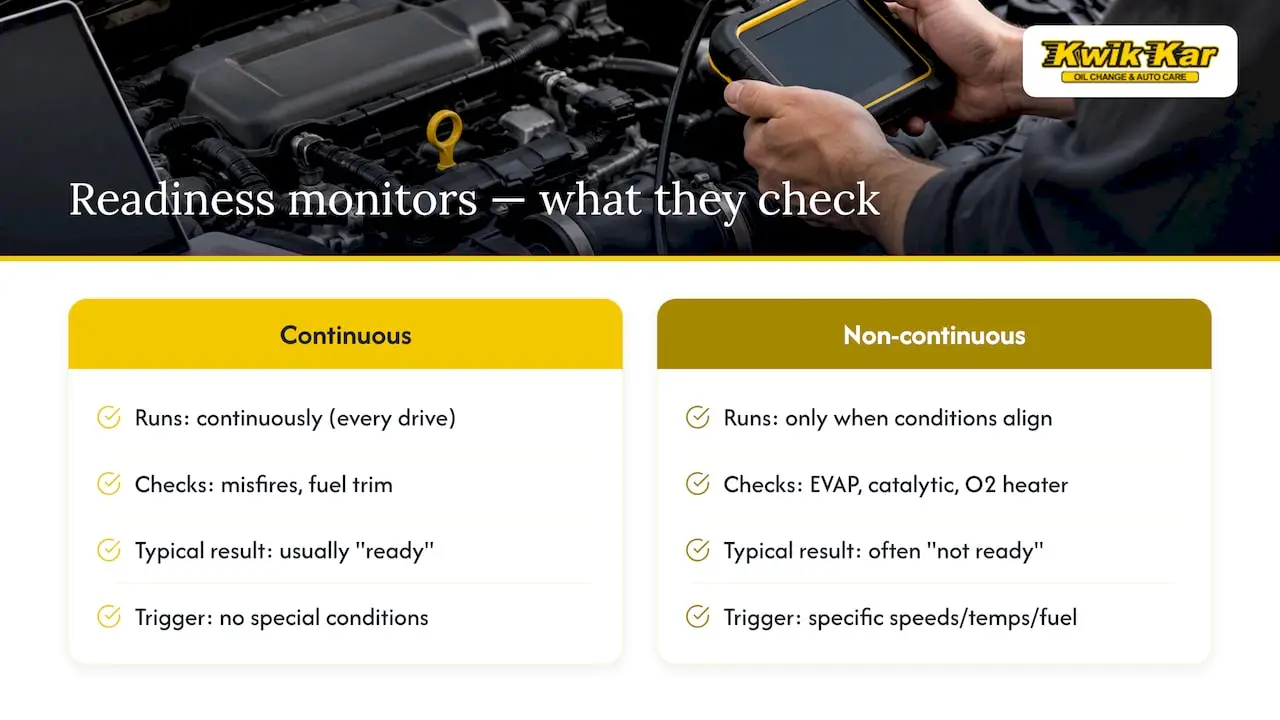
Your car’s OBD-II system runs a set of internal self-tests called readiness monitors. Each one reports back as “ready,” “not ready,” or “not supported,” depending on your vehicle. A “not ready” result simply means the routine hasn’t completed, not that something is broken.
Some monitors run continuously, checking things like misfires and fuel trim every time you drive. Others, called non-continuous monitors, only run when specific conditions line up, such as the evaporative emissions (EVAP) system, catalytic converter, and oxygen sensor heater circuits. These non-continuous monitors are the ones that usually show “not ready” and hold up an inspection, since they need particular speeds, temperatures, or fuel levels to trigger.
Passenger vehicles typically carry around 8 to 11 possible monitors, though not all apply to every car. Inspection stations generally only flag the ones relevant to your vehicle’s emissions equipment.
Why monitors stay incomplete after a repair or battery job
The most common reason a monitor shows “not ready” is something that recently reset the computer’s memory: a battery disconnect, a new battery installation, or a code clear with a scan tool. Any of these wipes the readiness status and starts the self-tests over from zero.
Other causes point to an actual problem that needs attention before the monitor can finish.
- A stored or permanent diagnostic trouble code (DTC) can block a monitor from completing, since the system won’t run a test it expects to fail.
- Failing components, such as a worn oxygen sensor, a struggling catalytic converter, or a small EVAP leak, can prevent the monitor’s exit criteria from ever being met.
- Short trips, a low fuel tank, cold weather, or frequent stop-and-start driving often don’t give the computer enough time or the right conditions to run its checks.
If you recently had work done, or the battery was disconnected for any reason, expect at least a few monitors to reset to “not ready” until you log enough driving time.
How long it takes monitors to set, and why diesels are different
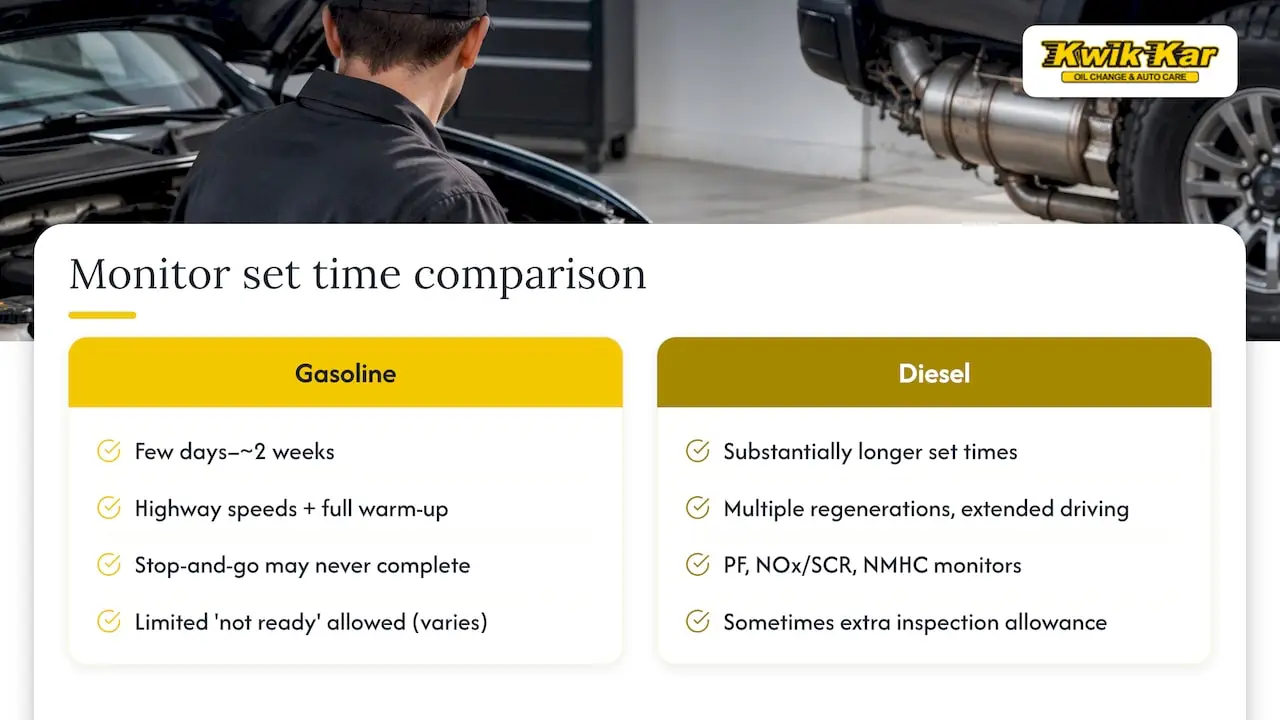
For most gasoline vehicles, normal daily driving sets the majority of monitors within a few days to about two weeks, assuming trips include some highway speed and full warm-up time. Stop-and-go driving alone can leave certain monitors incomplete indefinitely.
Diesel vehicles are a different story. According to EPA guidance on diesel OBD readiness, monitors tied to the particulate filter, NOx or SCR system, and NMHC catalyst can take substantially longer to set than gasoline monitors, sometimes requiring multiple regeneration cycles and extended driving before they complete.
Many state inspection programs allow a limited number of monitors to remain “not ready” for model-year 2001 and newer vehicles, though rules vary by state and diesels sometimes get additional allowances given how long their monitors can take to set. A permanent DTC changes the outcome regardless of monitor status: it generally needs to be resolved before the vehicle can pass, since permanent codes often persist even after repairs until specific driving conditions clear them.
If you’ve driven normally for a couple of weeks without any monitors changing status, that’s usually a sign something is preventing completion rather than a timing issue.
A drive cycle checklist to set monitors before your test
Before you start driving, a few conditions need to be right.
- Do not clear any codes. Clearing codes resets every monitor to “not ready” and makes your situation worse right before a test.
- Check your fuel level. Keep it between roughly one-quarter and three-quarters full, since a very full or very empty tank can block EVAP monitor tests.
- Confirm the battery and charging system are healthy. A weak battery can interrupt monitor completion partway through a drive.
- Start the engine cold and idle briefly, then drive at a steady highway speed (within the posted limit) for 10 to 20 minutes.
- Add a stretch of city driving with varied speeds, stops, and accelerations, then let the engine cool completely before repeating the cycle if needed.
EVAP monitors respond best to longer highway stretches and a fuel level that avoids topping off. If the gas cap was recently off or looks worn, check it and the visible hoses for obvious damage before you drive.
Pro Tip: Run a quick OBD scan right before you head to the inspection station. It only takes a few minutes and tells you exactly which monitors are set, so you’re not guessing.
Reading your scan results and knowing when to call a shop
A basic OBD scan gives you more than a pass or fail. Look at the readiness count, which monitors are listed as incomplete, and whether any codes are stored or permanent.
- Readiness count shows how many monitors have completed versus how many remain, which tells you if you’re close or still far off.
- Stored codes may clear on their own with more driving, but permanent codes typically require an actual repair before the related monitor will set.
- Freeze-frame data, when available, captures the conditions present when a code was triggered and can help pinpoint the cause.
If monitors stay incomplete after a proper drive cycle, or a permanent code shows up, further driving usually won’t fix it. That’s when a professional engine diagnostic makes sense, since a technician can pull live data and confirm which component is stopping the monitor from finishing. A digital vehicle inspection with photos and notes can also show you exactly what’s failing before any repair work begins.
What we see most often on pre-inspection scans
Battery disconnects, EVAP leaks, and aging oxygen sensors or catalytic converters account for most of the “not ready” cases we run into before an inspection. Our workflow starts with a pre-scan, moves into a digital vehicle inspection with photos and video, and ends with a verification drive once repairs are done. Fleet customers benefit from catching these issues on a schedule, well before an inspection date puts a vehicle out of service unexpectedly.
— Kwik Kar
Getting your monitors ready before inspection day
A failed readiness check costs you a second trip to the inspection station and another day without a clear answer. Skipping straight to a professional scan saves that round trip, especially when a permanent code or a stubborn EVAP leak is the real cause behind the “not ready” status.
Our shop can handle the parts of this process that a driveway scan tool can’t.
- Engine Diagnostic: pinpoints exactly which system is blocking a monitor from completing.
- EVAP and gas cap inspection: checks for the small leaks that commonly stall the evaporative monitor.
- Oxygen sensor and catalytic converter repair: addresses worn components tied to several non-continuous monitors.
- Pre-inspection readiness scan: confirms monitor status before you head to the test, so there are no surprises.
Technicians pair every diagnostic with a Digital Vehicle Inspection, so you see photos and notes on exactly what’s happening under the hood before any repair starts. If your monitors have stayed “not ready” longer than expected, book an Engine Diagnostic with a local auto care provider, or call ahead to ask about your upcoming state inspection.
Where these guidelines come from
Diesel readiness timelines and state exceptions come from EPA best-practices guidance on OBD readiness for vehicles under 14,000 pounds GVWR. General readiness and drive-cycle concepts follow common state DMV inspection guidance and standard OBD-II reference material.
FAQ
Why won’t my readiness monitors complete?
Monitors usually stay incomplete after a battery disconnect, a code clear, or because a faulty component like an oxygen sensor or EVAP system keeps failing its self-test. Short trips, low fuel, or cold weather can also prevent the right conditions from being met during normal driving.
Can you pass an inspection with one monitor not ready?
Many state inspection programs allow one monitor to remain “not ready” on model-year 2001 and newer vehicles, though exact rules vary by state and by fuel type. Diesel vehicles sometimes get additional allowances since their monitors, as noted in EPA diesel readiness guidance, can take much longer to set.
How long does it take for readiness monitors to reset?
Most gasoline vehicles set their monitors within a few days to about two weeks of normal driving that includes highway speed and full warm-up. Diesel vehicles can take considerably longer, since monitors tied to the particulate filter and NOx system may need multiple regeneration cycles to complete.
How do I get an EVAP readiness monitor ready?
Keep the fuel tank between roughly a quarter and three-quarters full, avoid topping off after the pump clicks off, and drive a longer stretch at highway speed. Check that the gas cap is tight and undamaged, since a loose cap is one of the most common reasons this monitor won’t complete.