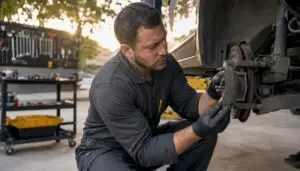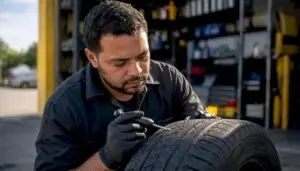
A digital vehicle inspection (DVI) is a multi-point checkup where a technician photographs and rates your car’s condition, then sends the report straight to your phone before any repair work starts. You get to see the worn brake pad or the corroded battery terminal yourself, in a picture, not just take someone’s word for it. Every DVI at a shop that does it right also feeds directly into your repair estimate and job card, so there’s a timestamped record of what was found and when you approved it.
- You see the evidence, not just a verbal recommendation
- You approve or decline from your phone, usually without downloading an app
- The findings attach to your repair order, creating a paper trail if a dispute ever comes up
Key Takeaways
A digital vehicle inspection gives you photographic proof of your car’s condition and lets you approve or decline repairs remotely, with every decision timestamped into your repair record.
| Point | Details |
|---|---|
| DVI defined | A technician photographs and rates your vehicle’s condition, then sends the report to your phone for review. |
| No app usually needed | Reports typically arrive by SMS or email and open in a standard phone browser. |
| Deferred work is tracked | Declined items stay saved with their original photo for reference at your next visit. |
| Integration builds accuracy | A connected DVI feeds findings straight into your estimate and job card, reducing billing errors. |
| Kwik Kar’s approach | Kwik Kar runs DVIs with photos, notes, and advisor follow-up on nearly every visit in Irving. |
Table of Contents
- How a Digital Vehicle Inspection Works, Step by Step
- What Vehicle Owners Actually Gain From a DVI
- What Technicians Check and What the Photos Show You
- Reading Your Report and Approving Work From Your Phone
- How Long a DVI Takes and What It Costs
- What Honest Shop Practices Look Like in Practice
- Connecting DVIs to Shop Software and Repair Records
- How Your Data Is Stored and Protected
- Are There Rules Governing Digital Vehicle Inspections?
- See Your Car’s Condition Before You Approve Any Repair
- Helpful Resources on Digital Vehicle Inspections
- Sources
- FAQ
How a Digital Vehicle Inspection Works, Step by Step
The process starts before your technician even opens the hood. Most shops select an inspection template matched to the visit, ranging from a quick 22-point check during an oil change to a 100-point workup for a pre-purchase evaluation or a car with multiple complaints, according to Pitlane’s rundown of DVI software. The template determines what gets checked and photographed, so a quick-lube visit won’t take as long as a full diagnostic.
Here’s the typical sequence once your keys hit the service counter:
- Walk-around and template selection. The technician picks the right inspection type for your visit and starts working through the checklist in a set order, usually exterior first, then under the hood, then a lift inspection.
- Photo and rating capture. Each checkpoint gets a photo and a quick condition rating, commonly color coded green for good, yellow for monitor, and red for needs attention now.
- Notes get added. A short technician note explains what the picture shows in plain language, not shop jargon.
- Findings populate the estimate. In a connected system, flagged items feed directly into the customer-facing report and can auto-suggest the service lines and parts needed, which means the estimate can be roughly 70% built before your service advisor even reviews it.
- Report goes out by text or email. You get a link, often viewable in your phone’s browser with no app install required.
- Your decision updates the shop’s system. Approvals trigger parts ordering and update the repair order in real time, with a timestamp marking exactly when you said yes.
Pro Tip: Open the link as soon as it arrives, even if you can’t approve anything yet. Scrolling through the photos while your advisor is still nearby means you can ask questions on the spot instead of playing phone tag later.
What Vehicle Owners Actually Gain From a DVI
Photo evidence changes the conversation. When a technician tells you the brake pads are thin, that’s an opinion you have to trust. When you see a picture of the pad next to a wear indicator, that’s a fact you can evaluate yourself. Shops that use photo and video evidence consistently see improved dispute resolution and higher approval rates compared to verbal-only recommendations, because customers stop wondering if they’re being upsold.
There’s a longer-term payoff too. If you decline a repair today, a connected DVI saves that declined item with its original photo as part of your vehicle’s history. Six months later, when that noise finally shows up, your advisor can pull up the exact photo from your last visit instead of starting the conversation from scratch.
A well-run DVI typically delivers:
- Fewer billing surprises, since findings and prices trace back to a specific photographed item
- Less time spent on the phone trying to picture what “worn” or “leaking” actually means
- Clearer priority between what’s a safety issue now and what can wait a few months
- A record you can reference at your next visit, even at a different location
A DVI is not a substitute for good diagnostics or a responsive advisor. The photos only matter if someone actually walks you through them, and a system alone won’t catch an intermittent electrical fault the way a proper diagnostic scan will.
What Technicians Check and What the Photos Show You
A standard DVI moves through several zones of the vehicle, and each one produces its own set of photographed findings. Knowing the categories in advance makes the report easier to read when it lands on your phone.
- Brakes: pad thickness, rotor condition, fluid level, and color
- Tires: tread depth, uneven wear patterns, sidewall damage, air pressure
- Fluids: engine oil, coolant, transmission and brake fluid levels and condition
- Electrical: battery terminals, charging output, warning lights
- Under-vehicle: exhaust, suspension components, visible leaks
- Interior and lights: wiper blades, cabin air filter, headlights and taillights
Common photo examples you’ll actually see in a report include a brake pad worn down to metal backing, a tire with tread near the legal wear bar, a coolant hose with visible cracking or a dried leak trail, and a battery terminal coated in white or blue corrosion. The color rating attached to each photo, green, yellow, or red, tells you at a glance whether something needs attention today or can be monitored.
| Checkpoint | Green (Good) | Yellow (Monitor) | Red (Needs Attention) |
|---|---|---|---|
| Brake pads | Above 5mm | 3 to 5mm | Below 3mm or metal-on-metal |
| Tire tread | Above 6/32 inch | Between 4 and 6/32 inch | Below 4/32 inch |
| Battery | Clean terminals, strong charge | Minor corrosion, weak test | Failed load test or heavy corrosion |
| Fluids | Full, correct color | Slightly low or discolored | Low, contaminated, or leaking |
Shops prioritize red items tied to safety, brakes, tires, steering, before flagging yellow items that fall under preventative maintenance. That’s why a worn tire usually shows up higher in your report than a slightly dirty cabin air filter.
Reading Your Report and Approving Work From Your Phone
Most DVI reports arrive by text message or email with a simple link, and Pitlane notes that many systems require no app installation at all, so the report just opens in your phone’s browser. Here’s how to make the most of those few minutes before you call your advisor back:
- Open the link and scroll through every photo, even the green items, so you understand the full scope of the checkup.
- Read the technician’s notes next to each photo. They’re written to explain the finding in plain terms, not to sell you on a repair.
- Tap approve or decline on each line item. Approving a red item typically triggers parts ordering immediately; declining saves it to your deferred work list rather than deleting it.
- Call or text your advisor with questions before you approve anything you’re unsure about. A quick photo zoom-in usually answers most of it.
Deferred items don’t disappear once you decline them. They stay attached to your vehicle record so the next visit starts with context instead of a blank slate.
Pro Tip: If a photo looks blurry or you can’t tell what you’re looking at, say so. A shop that takes DVIs seriously will happily walk you through it on a call rather than let you approve or decline something you don’t understand.
How Long a DVI Takes and What It Costs
A quick-lube DVI usually adds only a few minutes to your visit since the technician is already under the hood and around the wheels. A full multi-point inspection tied to a bigger repair takes longer, mostly because more photos and notes are involved. Delays typically come from one of two places: a tech who’s juggling multiple bays, or a vehicle with enough findings that the notes take real time to write clearly, as explained in the Vehicle Dent Repair Timeline: What to Expect.
Pricing approaches vary by shop. Some include the DVI at no extra charge as part of any service visit. Others bundle it into a maintenance package. It’s worth asking directly when you book, since practices differ even within the same city.
On the privacy side, expect your photos and report to be stored in the shop’s system tied to your vehicle and contact information, similar to how a paper repair history would be kept, just searchable and permanent instead of buried in a filing cabinet. Reputable shops don’t sell that data to third parties.
A few practical failure points to watch for:
- Photos taken quickly and out of focus, which make a finding hard to evaluate
- An advisor who sends the report but never follows up with a call
- Customers who never open the text link, which stalls the whole approval process
Not every customer opens an SMS link right away, so shops that plan for a phone call or emailed PDF backup avoid stalling the approval process entirely.
What Honest Shop Practices Look Like in Practice
Kwik Kar’s ASE-certified technicians run DVIs on nearly every visit, from a routine oil change to a full brake job or engine diagnostic. Every inspection includes photos, short video clips where useful, and written notes, all delivered straight to your phone and tied to your repair order.
The biggest mistakes shops make with digital inspections come down to treating photos as optional, skipping the follow-up call, and never tracking what a customer declined. A DVI only builds trust when every one of those steps happens the same way, every time.
That’s the standard Kwik Kar holds itself to on every visit:
- Photos are mandatory on flagged items, not left to a tech’s discretion
- Advisors call or text to walk through anything unclear before asking for approval
- Declined items stay saved to your vehicle’s record for the next visit
Connecting DVIs to Shop Software and Repair Records
A DVI is only as useful as the system it feeds into. On its own, a set of photos and notes is just documentation. Connected to your shop’s management software, it becomes something closer to a live repair record: findings populate the estimate automatically, photos attach to the job card, and your approval history stays tied to the vehicle rather than a loose piece of paper.

This integration is what separates a genuinely useful DVI from a gimmick. When a technician flags a worn serpentine belt, a connected system can pull that finding straight into the estimate with the part and labor line already suggested, cutting out the manual re-entry that used to eat up an advisor’s morning. It also means your vehicle’s history travels with it inside the shop’s records: the next time you come in, your advisor can pull up last visit’s declined brake job without asking you to remember what was said.
For fleet owners, this matters even more. A fleet management program that runs on connected DVIs gives you a searchable record across every vehicle you manage, not just the one currently on the lift. You can see which trucks have deferred work piling up and which ones are due for the next round of preventative maintenance, all from reports that were generated automatically during routine service.
The takeaway for you as a customer: ask whether a shop’s DVI system talks to its estimating and scheduling software, or whether it’s a standalone app that dead-ends after the photos get taken. That difference determines whether your repair history is actually usable a year from now.
How Your Data Is Stored and Protected
Every DVI photo, note, and approval you generate gets stored somewhere, tied to your name, your vehicle, and often your contact information. That’s worth understanding before you tap “approve” on your phone.
Most shop management systems store DVI data on secure servers, the same way they’d store your service history or payment information, rather than on an individual technician’s personal device. Reputable shops don’t sell your inspection data or vehicle information to third-party marketers, and any text or email link you receive should come from the shop’s official system, not a personal number.
That said, you have some responsibility on your end too. Treat the SMS or email link the same way you’d treat any other message with personal information attached: don’t forward it to strangers, and if you ever get a suspicious inspection link you didn’t expect, call the shop directly to confirm it’s legitimate before clicking anything.
If you’re a fleet manager overseeing multiple vehicles and drivers, ask specifically how the shop handles data access permissions. You want visibility into every vehicle under your account, but you probably don’t want every driver seeing every other driver’s inspection history. A shop with a mature DVI system will have those permission levels already built in, rather than treating your fleet as one shared login.
Are There Rules Governing Digital Vehicle Inspections?
There’s an important distinction worth clearing up here: the consumer-facing DVI covered throughout this article is not the same thing as a commercial Driver Vehicle Inspection Report, or DVIR, which is a federally regulated requirement for commercial truck drivers under the Federal Motor Carrier Safety Administration. Some vendor materials blur that line, but they serve different purposes for different audiences.
For everyday consumer inspections at a repair shop, there’s no single federal standard dictating exactly how a DVI must be formatted or delivered. Instead, the standards that matter come from within the industry itself: shop management software providers build their own inspection templates, and reputable shops adopt practices like mandatory photo documentation and audit-trail timestamps because they build trust, not because a regulator requires it.
State vehicle inspection laws are a separate matter entirely, and they vary. Some states require periodic safety or emissions inspections through state-run programs; others have scaled those requirements back or eliminated them altogether. A shop’s digital vehicle inspection, the kind covered in this article, doesn’t replace whatever state inspection your vehicle may or may not be required to pass. Always check your specific state’s requirements rather than assuming a shop’s internal DVI satisfies a state mandate.

See Your Car’s Condition Before You Approve Any Repair
Kwik Kar runs a digital vehicle inspection on nearly every visit, with photos, short videos, and technician notes sent directly to your phone before any work begins. That means you’re never approving a repair based on a guess. You’re looking at the actual worn brake pad or the actual leaking hose, tied directly to a real estimate on your real vehicle.
If a DVI flags something during your visit, whether it’s brake wear, an electrical issue, or a fluid leak, you can move straight to booking through Kwik Kar’s full auto repair services, check current specials and coupons to offset the cost, or head straight to brake repair if that’s what came up red on your report. Before your next visit, it helps to jot down any noises, warning lights, or concerns you want your technician to specifically check and photograph. That way your DVI addresses exactly what’s bothering you, not just the standard checklist. Ready to see your vehicle’s condition in real photos instead of a verbal guess? Schedule your next visit and ask for a full digital inspection.
Helpful Resources on Digital Vehicle Inspections
- WorkshopSoftware’s DVI overview: explains how digital records replace paper forms
- Autorox’s DVI breakdown: covers job card and estimate integration
- Pitlane’s DVI feature page: details no-app delivery and templates
Sources
- Digital Vehicle Inspection in Auto Repair: What It Is and Why It Matters | Autorox
- Digital Vehicle Inspection Software for Auto Shops | Pitlane
FAQ
What Is a Digital Vehicle Inspection?
A digital vehicle inspection is a checkup where a technician photographs and rates your vehicle’s condition, then sends the report with notes to your phone for review before repairs begin.
Is North Carolina Getting Rid of Vehicle Inspections?
State inspection requirements vary and change over time, so check your state’s current DMV or transportation department guidance directly rather than relying on a shop’s internal digital inspection, which is a separate consumer service.
What Is the Best Free Digital Vehicle Inspection App?
There’s no single universally “best” free app since shops use different management systems, but as a customer, you typically don’t need to download anything. Reports arrive by SMS or email link that opens right in your phone’s browser.
Can You Do Car Inspections Online?
Yes, in the sense that you review and approve a digital vehicle inspection report online from your phone, but the physical inspection itself still requires a technician to examine the vehicle in person. Kwik Kar sends its DVI reports straight to your phone for exactly this kind of remote review.